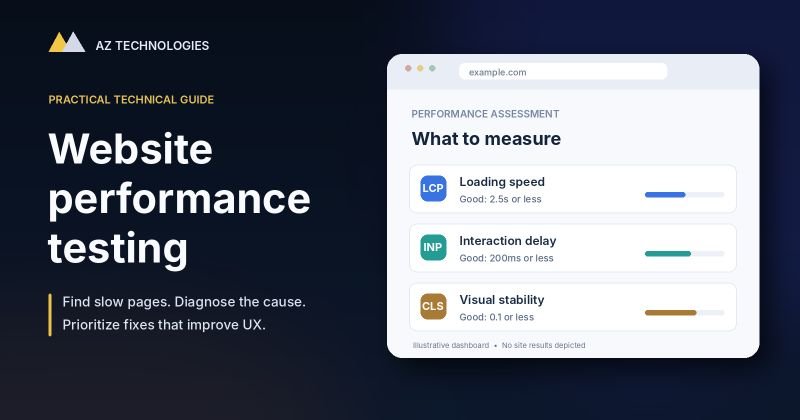
Website performance testing is one of the simplest ways to identify technical problems that may be costing your business visitors, inquiries, and sales.
A website can look professional and still be frustrating to use. A landing page may take too long to display its main content. A contact form may respond slowly. A booking widget may freeze momentarily after someone clicks it. On mobile devices, these issues can become even more noticeable.
The challenge is figuring out what is actually slow, why it is happening, and which improvements deserve attention first.
In this guide, we’ll explain how to test website performance, interpret the results, and prioritize technical fixes based on their potential business impact.
What Is Website Performance Testing?
Website performance testing is the process of measuring how quickly and reliably a website responds to users.
It looks at more than the time required to load a page. Effective testing considers how quickly important content appears, whether buttons and forms respond smoothly, and whether the layout remains stable while the page loads.
There are several related types of testing:
- Page speed testing: Measures how quickly a page loads and displays its content.
- User experience performance testing: Evaluates responsiveness and visual stability during interactions.
- Load testing: Examines how a website or application behaves when many users access it simultaneously.
- Ongoing performance monitoring: Tracks changes in speed and reliability over time.
These activities answer different questions. A page that loads quickly for one visitor may still struggle under heavy traffic. Likewise, a page may load rapidly but become sluggish when someone opens a menu, submits a form, or interacts with a complex dashboard.
For most business websites, the best starting point is page speed and user experience testing.
Why Website Performance Matters for Business
Slow website performance creates friction between a visitor’s intention and the action you want them to take.
Consider a prospective customer who clicks an advertisement, opens a service page, and tries to schedule a consultation. If the page loads slowly or the booking interface becomes unresponsive, the visitor may abandon the process before submitting an inquiry.
Similar problems affect ecommerce stores, customer portals, online marketplaces, and SaaS applications.
Poor performance can contribute to:
- Visitors leaving before important content appears
- Interrupted contact forms, bookings, or checkout processes
- Frustrating experiences on mobile devices
- Lower confidence in a website’s reliability
- Additional support requests and operational difficulties
Website speed also matters for SEO. Google uses Core Web Vitals as part of its ranking systems, although strong performance scores alone do not guarantee higher search rankings.
The more useful business question is not simply, “How fast is our website?”
It is “Is website performance making it harder for customers to accomplish what they came here to do?”
Understanding Google’s Core Web Vitals
Google’s Core Web Vitals measure three important aspects of real-world website experience: loading performance, interaction responsiveness, and visual stability.
The current metrics are Largest Contentful Paint (LCP), Interaction to Next Paint (INP), and Cumulative Layout Shift (CLS).
Largest Contentful Paint (LCP): Loading Speed
LCP measures how long it takes for the largest visible content element, such as a prominent image or heading, to render.
Good performance: 2.5 seconds or less.
A poor LCP score can mean visitors wait too long before seeing the main content they came to read.
Common causes include oversized hero images, slow server responses, render-blocking resources, and delays in loading essential assets.
Interaction to Next Paint (INP): Responsiveness
INP measures how responsive a page is to user interactions throughout their visit.
Good performance: 200 milliseconds or less.
If a visitor clicks a menu, chooses a product option, or interacts with a form and the page responds noticeably late, INP may reveal the problem.
Heavy JavaScript, expensive event handlers, and complex front-end components can contribute to poor responsiveness.
INP replaced First Input Delay (FID) as a Core Web Vital in March 2024. Older website performance guides that still treat FID as a current Core Web Vital are outdated.
Cumulative Layout Shift (CLS): Visual Stability
CLS measures unexpected movement of page elements while someone is viewing or interacting with a page.
Good performance: 0.1 or less.
For example, a visitor may be about to click a button when an image, advertisement, or banner loads and pushes the button somewhere else.
Common causes include images without reserved dimensions, dynamically inserted content, and components that change size after loading.
Google recommends evaluating these metrics at the 75th percentile of real-user experiences, with mobile and desktop assessed separately.
For the latest definitions and thresholds, refer to Google’s Core Web Vitals documentation.
How to Test Website Performance: A Practical Step-by-Step Process
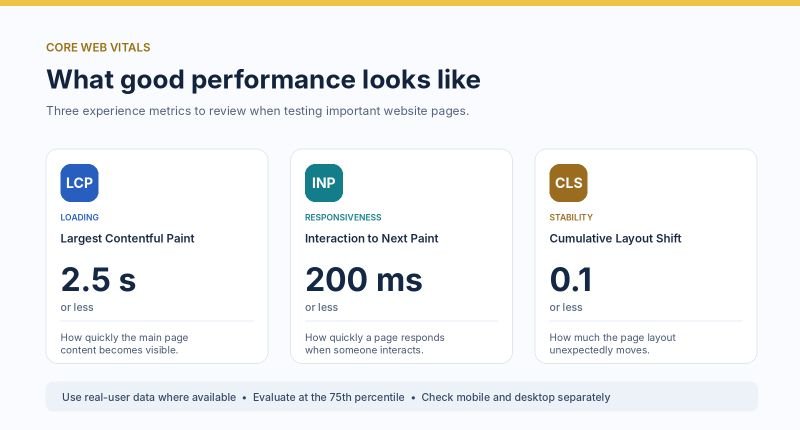
Google’s Core Web Vitals thresholds for loading performance, responsiveness, and visual stability.
You don’t need to be a developer to perform an initial website performance assessment. The following process can help business owners and technical teams identify where to investigate.
Step 1: Start With Important Business Pages
Don’t limit testing to the homepage.
Choose pages that are important to your business and where a poor user experience could interfere with conversions or customer activity.
Examples include:
- Your homepage and primary service landing pages
- Contact forms and consultation booking pages
- Product pages, shopping carts, and checkout flows
- Customer login pages and account dashboards
- Frequently used workflows within web applications
A website might have an excellent homepage performance score while its checkout or booking process performs poorly.
Testing the pages that matter commercially makes your findings more useful.
Step 2: Run a Google PageSpeed Insights Test
Open Google PageSpeed Insights and enter the URL you want to evaluate.
Review the mobile and desktop results separately.
PageSpeed Insights provides two important types of information:
Real-user data (field data)
When sufficient data is available, this section describes how actual Chrome users have experienced the page or website over a recent reporting period.
It is particularly useful for understanding whether performance issues occur in normal usage.
Simulated test results (lab data)
These results come from Lighthouse testing under controlled conditions. They help identify specific technical issues and potential improvements.
A page may perform differently in lab testing than it does for real users. Differences in devices, network connections, caching, and actual user behavior can all affect the experience.
If PageSpeed Insights reports insufficient real-user data, that does not automatically mean the website is performing poorly. Smaller or newer sites may simply lack enough eligible traffic for field reporting.
Record the initial results before making changes.
Step 3: Use Lighthouse and Network Diagnostics
PageSpeed Insights is a good starting point, but sometimes the recommendations are too general to identify the real problem.
For a deeper investigation, open your website in Chrome and use Developer Tools.
Lighthouse can provide additional diagnostics, while the Network panel helps reveal how resources are requested and loaded.
Pay attention to:
- Slow server responses
- Large images or video files
- JavaScript and CSS delaying page rendering
- Third-party scripts
- Unexpected redirects
- Large numbers of requests
- Resources that load earlier than necessary
A network waterfall shows which requests start first, which run simultaneously, and where delays occur.
Additional tools such as GTmetrix and WebPageTest can help investigate loading behavior under different conditions.
The objective is not to collect as many reports as possible. It is to identify the bottlenecks that explain what visitors are experiencing.
Step 4: Identify the Root Cause Before Making Changes
Performance reports often produce long lists of suggested improvements.
Not every recommendation deserves the same priority.
For example, if your main landing-page image is responsible for a slow LCP score, optimizing unrelated JavaScript files may have little immediate effect on the issue.
Similarly, if a booking form becomes unresponsive because of a heavy script, image compression alone won’t solve the interaction problem.
Connect each finding to a likely cause, then evaluate the options for correcting it.
Step 5: Retest and Measure the Difference
After making a change, test the same pages again using comparable conditions.
Document what changed, which metric improved, and whether the user experience is noticeably better.
You should also examine business results where reliable tracking is available.
For example:
- Are visitors successfully completing contact forms?
- Are more users reaching checkout?
- Are booking interactions completing as expected?
- Are mobile visitors experiencing fewer errors?
- Have page abandonment patterns changed?
Google Analytics 4 can help track meaningful user actions, while Google Search Console provides ongoing visibility into Core Web Vitals and search performance.
An improvement in a performance score is useful. An improvement in the customer experience is the real goal.
Common Website Performance Problems and How to Fix Them
Once you’ve identified the cause of a slow page, you can consider the appropriate technical solution.
1. Oversized Images and Media
High-resolution images can be unnecessarily large, especially on mobile devices.
Potential improvements include:
- Compressing images without noticeably reducing quality
- Using efficient image formats such as WebP or AVIF
- Serving appropriately sized images for different screens
- Lazy-loading images that are below the fold
- Prioritizing the main above-the-fold image when it is an LCP element
Avoid indiscriminately lazy-loading the main hero image. Delaying that image can actually make perceived page loading slower.
2. Excessive JavaScript and Third-Party Scripts
Analytics tools, chat widgets, marketing tags, plugins, and embedded applications can all add JavaScript to a page.
These tools may be useful, but they also consume browser resources.
Review which scripts are necessary, which load on every page, and which can be delayed until needed.
On some websites, interaction delays are caused less by the main application code and more by scripts introduced through plugins or third-party services.
3. Slow Hosting or Server Responses
If the server takes too long to begin responding, front-end optimization has limited ability to solve the overall delay.
Potential causes include inefficient database queries, limited server resources, slow backend code, or poorly configured caching.
Improvements may involve application profiling, database optimization, server configuration, object caching, or infrastructure changes.
Changing hosting providers should not be the automatic first response. The underlying bottleneck should be identified before recommending a migration.
4. Ineffective Caching
Caching can reduce repeated work and help a website serve content more efficiently.
Browser caching, full-page caching, object caching, and content delivery networks address different parts of the problem.
However, not all pages should be cached the same way.
Ecommerce carts, account pages, checkout sessions, and personalized application data require special consideration to prevent visitors from seeing stale or incorrect information.
5. Heavy WordPress Themes and Plugins
WordPress websites can accumulate unnecessary performance overhead as plugins, page builders, and custom features are added.
A site may use several plugins that load scripts and styles on pages where they aren’t needed.
A performance review should examine plugin responsibilities, asset loading, database activity, and interactions between theme components.
Removing plugins without understanding their business function can introduce new problems, so changes should be tested carefully.
For businesses operating more complex websites, marketplaces, and online platforms, our SaaS MVP & Web Platform Development services cover broader technical architecture and platform development considerations.
How to Prioritize Website Performance Improvements
One of the most common mistakes is treating every performance warning as equally important.
A more useful approach is to prioritize findings based on three factors:
1. User impact
How noticeably does the problem affect the visitor?
A booking form that freezes for several seconds may deserve more attention than a minor delay on a rarely visited informational page.
2. Business importance
Does the issue affect a critical business process, such as a sale, inquiry, registration, or customer workflow?
3. Implementation effort and risk
Can the problem be addressed safely through a small configuration change, or does it require application changes and more extensive testing?
A practical improvement plan might prioritize:
- High priority: Broken or unresponsive business-critical interactions, major mobile loading delays, or errors affecting transactions.
- Medium priority: Slow secondary pages, inefficient asset loading, or measurable issues with common user journeys.
- Lower priority: Minor scoring improvements with limited visible impact or no clear relationship to business outcomes.
This helps avoid spending substantial development time chasing small improvements that customers may never notice.
When Page Speed Testing Is Not Enough
A standard PageSpeed Insights report evaluates page loading and user experience under particular conditions. It does not replace every other kind of performance testing.
For an ecommerce platform, membership website, or SaaS application, additional testing may be necessary.
Load testing evaluates how the application behaves as the number of concurrent users or requests increases.
Backend performance testing examines slow queries, API response times, background processes, and application-level bottlenecks.
User journey testing evaluates whether important workflows remain responsive from beginning to end.
For example, a marketplace may load its homepage quickly but struggle when multiple users search listings, submit requests, or process transactions.
In these situations, improving one page’s Lighthouse score is only part of the solution.
How Often Should You Test Website Performance?
Performance testing should be part of an ongoing website maintenance process.
At a minimum, consider testing:
- Before launching a new website or application
- After major theme, plugin, or platform changes
- When introducing new third-party tools
- After significant infrastructure changes
- When users report slow or unreliable behavior
- Periodically for high-traffic or business-critical pages
For more complex platforms, automated monitoring and performance regression tests can identify issues that appear after releases or changes in traffic.
The appropriate frequency depends on the website’s complexity, traffic, and importance to business operations.
Frequently Asked Questions About Website Performance Testing
What is a good website performance score?
Lighthouse scores of 90–100 are generally classified as good, but the score should not be treated as the only measure of website quality.
A useful performance assessment also considers Core Web Vitals, important user journeys, and business outcomes.
Is Google PageSpeed Insights enough to test a website?
It’s an excellent starting point for page speed and user experience diagnostics.
However, it does not replace server monitoring, application profiling, transaction testing, or load testing for complex websites.
Can website performance testing improve SEO?
Performance improvements can support a better page experience, and Google uses Core Web Vitals within its ranking systems.
However, rankings also depend on content relevance, search intent, competition, and many other factors. A perfect speed score does not guarantee higher rankings.
Should I optimize desktop or mobile performance first?
Test both.
If mobile users account for a significant share of your audience, mobile performance may deserve particular attention. Priorities should reflect your actual visitors and which devices they use to complete important actions.
How do I know whether my hosting provider is causing the problem?
Look at server response times, backend diagnostics, and application behavior before assuming hosting is responsible.
Slow performance can result from code, database queries, caching, external APIs, or infrastructure limitations. Often, several factors contribute.
Need Help Diagnosing a Slow or Unreliable Website?
Website performance problems are not always isolated to images, plugins, or hosting.
Sometimes they reflect deeper issues with platform architecture, integrations, application code, or the way critical business workflows have been implemented.
AZ Technologies helps businesses evaluate, build, integrate, and improve web platforms and the systems behind their operations.
Whether you’re dealing with a slow WordPress site, a complex business application, or a platform that struggles as usage grows, we can help assess the technical challenges and determine a practical path forward.
Contact AZ Technologies to discuss your website or platform challenges.
Or explore our SaaS MVP & Web Platform Development services to learn more about our approach to web platforms and business systems.