Executive Summary
For manufacturing companies, keeping supplier documentation current is more than an administrative task. Certificates, safety documentation, facility records, and compliance declarations need to be available, organized, and reviewed when required.
Yet many organizations still manage these records through email attachments, shared folders, and spreadsheets. As the number of suppliers and facilities grows, it becomes increasingly difficult to know which documents are current, which require review, and where follow-up is needed.
AZ Technologies worked on a SharePoint supplier document management solution focused on bringing structure to these workflows.
The approach used Microsoft SharePoint and Microsoft 365 capabilities to organize supplier records, support document collection and review, and establish clearer processes around document status, ownership, and access.
The objective was to make supplier documentation easier to manage without introducing an unnecessarily complex standalone compliance platform.
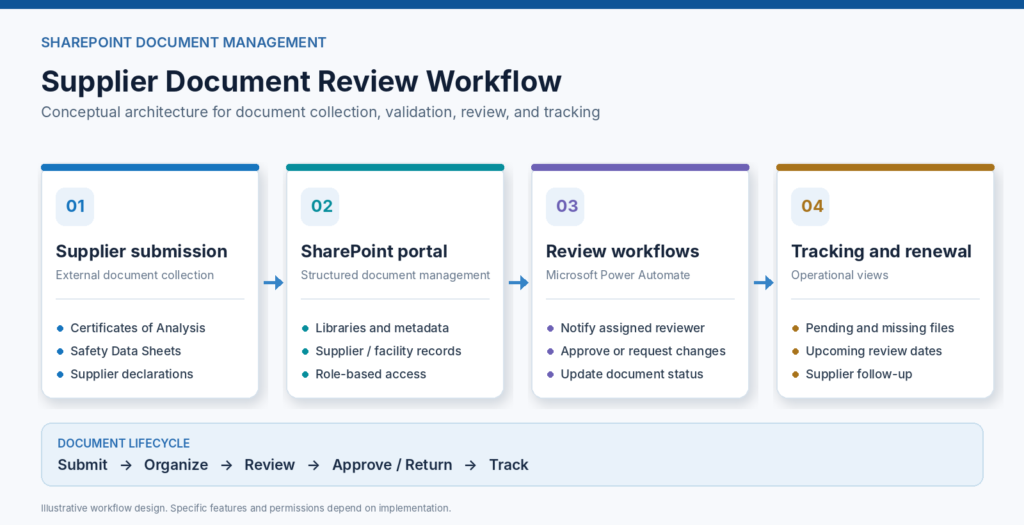
Illustrative SharePoint supplier document management and approval workflow
The Challenge: Managing Supplier Compliance Documents Across Multiple Facilities
Manufacturing operations depend on documentation supplied by external vendors, often with different requirements for individual facilities, products, and business relationships.
Common document types include:
Certificates of Analysis (COAs): Documentation relating to product specifications and quality requirements.
Safety Data Sheets (SDS): Safety information used in handling and managing chemicals and materials.
Supplier declarations: Annual or periodic statements relating to quality, compliance, or business requirements.
Supporting certificates: Additional documentation required for particular suppliers, facilities, or materials.
The problem is rarely just storing these files. It is maintaining a process around them.
When documentation is spread across emails and shared drives, employees face recurring questions:
Has the supplier submitted the latest document?
Which facility or supplier does the document belong to?
Has someone reviewed and accepted it?
Is the document still valid?
Who should follow up when something is missing?
Without a consistent structure, staff can spend unnecessary time searching for documents, reconciling versions, and contacting suppliers for information already requested.
AZ Technologies’ Approach
The solution centered on using SharePoint as a structured document management environment rather than simply another place to upload files.
This required thinking through the relationships between suppliers, facilities, document types, review responsibilities, and business processes.
1. Structuring Supplier Documents in SharePoint
The first consideration was how documents should be organized so employees could find relevant information without navigating increasingly complicated folder structures.
A metadata-driven approach provides a more flexible way to manage supplier documentation.
Important fields can include:
Supplier or vendor name
Facility or business location
Document type
Applicable product or material
Submission or effective date
Expiration or renewal date
Review status
Internal document owner
With this structure, SharePoint libraries and filtered views can help employees locate records based on business context rather than file names alone.
For example, a quality team may need to view outstanding supplier declarations for a particular facility, while another department may need to identify documents awaiting review.
This is a core principle of our Microsoft 365 & SharePoint consulting services: structure the system around the way people work, not simply around the way files are stored.
2. Designing a Supplier Document Portal
An effective supplier document portal needs to accommodate both internal employees and external suppliers.
These audiences have different responsibilities and should not necessarily have access to the same information.
The solution approach considered how suppliers could provide requested documentation while internal teams maintained control over document organization, review, and approval.
Key design considerations included:
Providing a clear process for collecting documents
Organizing records by supplier and facility
Separating supplier-facing interactions from internal review processes
Restricting access based on business roles and responsibilities
Maintaining consistent document status and ownership
This structure creates a clearer distinction between receiving a document and accepting it as part of the organization’s records.
3. Building Document Review and Approval Workflows
Collecting a document is only one part of the process.
Once submitted, a certificate or declaration may need to be reviewed, accepted, rejected, or returned to the supplier for correction.
Microsoft Power Automate can support this process by connecting document events with review activities.
A structured workflow can follow these stages:
Document Received → Validation → Internal Review → Approved or Returned → Record Updated
Depending on operational requirements, the workflow can support:
Notifications when new documents require attention
Routing to designated reviewers
Approval and rejection decisions
Status updates within SharePoint
Follow-up requests for incomplete submissions
Reminders for approaching renewal dates
The goal is not to automate every decision. It is to reduce repetitive coordination while preserving appropriate human review.
AZ Technologies approaches these requirements through workflow automation consulting, using the capabilities of Microsoft 365 and the surrounding business systems.
4. Managing Internal and External Access
Supplier documentation can contain commercially sensitive information, and different suppliers should not automatically have visibility into each other’s records.
Access management is therefore an important architectural consideration.
A SharePoint-based solution can use appropriate Microsoft 365 permissions, external collaboration settings, and separate document access boundaries to manage these requirements.
The design should account for:
Internal employee permissions
External supplier access
Document-level or library-level visibility
Review and approval responsibilities
Processes for removing access when no longer required
The specific security configuration must reflect the organization’s Microsoft 365 environment and compliance requirements.
The Solution Architecture: SharePoint as an Operational Document System
Rather than treating SharePoint as an isolated file repository, the solution model connects document storage with business processes.
The architecture can be represented as:
Suppliers and Internal Teams → SharePoint Document Portal → Metadata and Permissions → Power Automate Review Workflows → Approved Records and Operational Views
Each component serves a purpose.
SharePoint document libraries provide an organized location for supplier records.
Metadata and views make it easier to identify documents by facility, vendor, document type, and status.
Access controls establish who can submit, review, and access records.
Power Automate provides a way to coordinate document routing, notifications, and approvals.
Operational views help staff identify missing information, pending reviews, and records requiring attention.
This approach makes better use of technology many organizations already license through Microsoft 365.
Outcomes and Business Value
The primary value of a structured SharePoint supplier document portal is greater control over documentation processes that are otherwise difficult to coordinate.
The architecture and workflow approach supports several operational improvements.
A Clearer System of Record
Organizing documents around suppliers, facilities, and metadata gives employees a more consistent way to locate relevant records.
More Consistent Document Reviews
Defined statuses and review responsibilities make it easier to distinguish received documents from those awaiting validation or approval.
Less Manual Coordination
Workflow notifications and structured review processes can reduce reliance on repeated emails and spreadsheet updates.
Better Visibility Into Outstanding Requirements
Filtered SharePoint views can help teams identify missing, pending, or expiring documents without manually reviewing every supplier record.
A Foundation for Future Process Improvements
A structured SharePoint environment can support additional requirements as the organization evolves, including more advanced workflow automation, reporting, or integration with other business systems.
These are the operational benefits supported by the solution design. Specific efficiency gains depend on how the workflows are implemented and adopted.
Is Your Team Still Chasing Supplier Documents Through Email?
If your organization relies on scattered folders, spreadsheets, and email reminders to manage supplier documentation, there may be a more manageable way to structure the process.
AZ Technologies helps businesses design SharePoint document portals, organize Microsoft 365 environments, and automate document collection, reviews, and approvals.
Request a Consultation to discuss your document management requirements, or contact us about your project.
What Businesses Should Consider Before Building a SharePoint Supplier Portal
A successful supplier portal starts with the underlying business process.
Before building the system, organizations should answer several questions.
Who owns the document review process?
Employees should know who is responsible for accepting, rejecting, or requesting corrections to submitted records.
How should suppliers and facilities be represented?
Document structure needs to account for suppliers operating across multiple locations and documents that apply to different products or facilities.
Which documents need renewal or periodic review?
Expiration dates, document versions, and recurring supplier declarations should be incorporated into the workflow where applicable.
What should external suppliers be allowed to access?
Supplier-facing access should be intentionally designed rather than relying on broad sharing permissions.
Which steps should be automated?
Notifications, routing, reminders, and status updates are useful automation candidates. Decisions requiring technical or compliance judgment may still need human review.
Addressing these questions before implementation helps avoid a portal that recreates the same administrative problems in a different application.
How AZ Technologies Can Help
AZ Technologies provides practical Microsoft 365 and SharePoint consulting for businesses that need more structured document and collaboration processes.
Our capabilities include:
Microsoft 365 document libraries, metadata, and permissions
External supplier and vendor collaboration
Supplier compliance document tracking
Microsoft 365 process integration
We focus on building systems that reflect the way your organization operates, with an emphasis on practical implementation, clear ownership, and maintainability.
Have a similar SharePoint or document workflow challenge? Contact AZ Technologies to discuss your project.